Breaking Up with Google #3 — Changing e-mail as login
This article is part of the “Breaking Up With Google” series, an experiment in untangling myself from Google’s ecosystem — one service at a time. Visit the tag #breaking-up-with-google for more.
In the first article, I realized my biggest priority to get out of Google was to get rid of Gmail, and to do so, I outlined two roadblocks in the second one:
- My huge e-mail archive
- All the places I would have to update my e-mail as the credential for login and/or to receive communications.
As you know, the first was dealt with successfully, reducing my mailbox footprint by a whopping 97%, now we need to address the second, so let’s get to it.
Where is my e-mail used?
I’ve been a password manager user for several years now1, more precisely a happy paid Bitwarden user since 20212. For that reason, it is fair to say that every possible active login that I still have3 is saved there, as it would have taken not logging in on a service for over 10 years to fail to register it.
My first step was heading to Bitwarden and exporting my vault to get some data on my saved logins:

AI-generated image using ChatGPT with a prompt akin to “Medieval-inspired picture of a nerd that looks like me holding a long paper that runs through the height of the body and goes through, like a huge letter, containing a list of indiscernible service names”
That is a lot, roughly 75% of my saved credentials rely on e-mail for login and even if the other 25% don’t (using username, social security number or cell phone number instead) they likely also have the e-mail there somewhere as a form of backup in case of forgotten passwords or to send spam useful e-mail.
In addition, I also checked to see how many services I was using the “Sign-in with Google”, but that was a lot smaller, just five, probably because since managing a lot of passwords became easy, I’d rather create an account than rely on Google login, which could potentially stop working for no good reason.
Where can I change my e-mail?
With those findings, I got to do one of the most boring investigations ever: logging into every website and searching for a way to change my e-mail. Some would make it as easy as updating a form, others would require contacting support and there were the few that would not even show you which e-mail you had used to sign-up. Ultimately here is the break-down of that investigation:
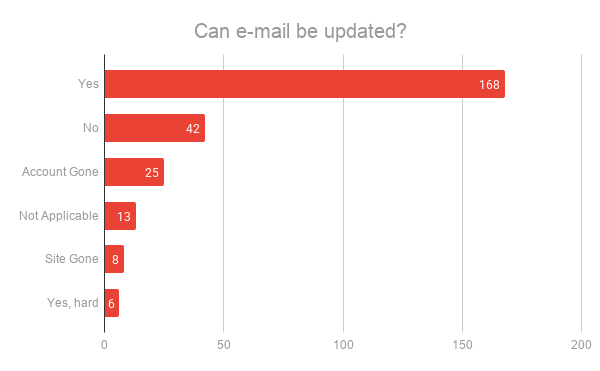
Result of investigation if e-mail could be changed on each service
- 33 of them I didn’t even have to bother: the site had either shut down or already deleted my account4.
- 13 were not applicable, like changing the e-mail of gmail or services that really didn’t have an e-mail associated.
- 174 allowed me to change it, 80% of the remaining valid logins, which is honestly more than I expected when I started this, albeit 6 of them were hard to do so (required contacting customer support in some way).
- 42 of them don’t seem to provide any way to change it, and I was really digging through and trying to find a way before concluding it didn’t allow.
Out of all the ones that don’t allow me to change the e-mail, most are related to shopping or entertainment, so it didn’t bother me much. A couple of them are tied to services with active subscriptions or communities, which would be some nuisance, but overall seemed ok. And I also reduced the “sign-in with google” from 5 to none.
Wrap-up
It seems doable to switch to a new e-mail provider without being locked away from any important service, but I’d still have to keep gmail around if I didn’t want to create a new account on roughly 20% of them.
Another benefit of having done this audit is that now I know which websites I can further extend the practice of not using the raw e-mail address, and instead use the “Gmail + trick”, which I am already using on 25% of the services. This can be useful to track who is leaking my e-mail when I get that random newsletter you never signed up to5.
Now I feel ready to try some other service, see you in the next post of the series!
Random Bits
During the investigation there were a few website behaviors that were interesting, for lack of better word, and I thought it would be fun to report them here:
- Most services limit your password size to something between 8-15 characters, but not the Brazilian government, who ask you to make it no longer than 70 characters! 😂
- To keep you safe, the website to purchase train tickets from Vale requests you to no reuse any of the last 24 passwords!
- Gol, one of the top 3 airlines in Brazil, has a website that doesn’t finish loading up on Brave. Neither does Yahoo mail!
First using LastPass’ free version and then migrating to Bitwarden due to some change in LastPass use model which I don’t remember. ↩︎
Though that might change over the course of this series 👀. ↩︎
Since every now and then I use justdeleteme.xyz to clean-up some. ↩︎
I was happy to see a 12% reduction in my Bitwarden vault 😁. ↩︎
Though it hasn’t worked once to this day 😂. ↩︎