Experimentation - Windows Launchers
What are Launchers?
Every time someone needs to do something different on Windows, like open a file or find an application, most will either resort to their desktop shortcuts or slowly navigate their start menu until they find it, while some might even search on Windows Explorer and fewer still will hit the windows keyboard key and go from there.
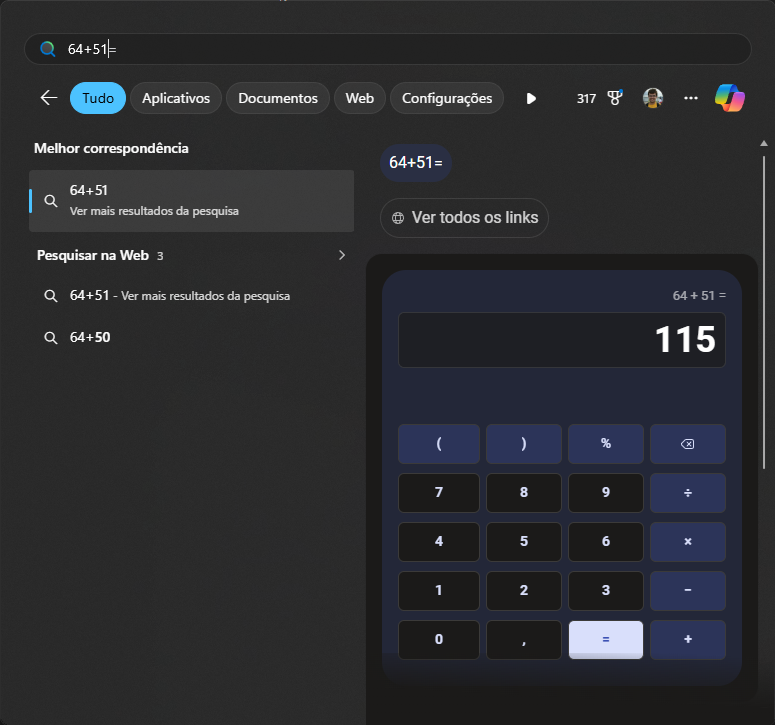
Trying a sum operation after hitting the windows key
The windows key today is the starting point of what most would call a launcher: press it and from there find files, apps, do web searches or math without having to open the calculator. The idea is that it will take you to anywhere you might need to go, regardless of where that is, and while this can be extremely useful, the modern launchers go even further.
Why change Launchers?
The big problem with Windows native launcher is that it is too basic, barely customizable1 and often has a hard time finding files, thus apart from the basic searches where you would expect it to work on, it mostly leaves you wanting more.
Custom launchers today have a lot of built-in extensions to make your life easier on the launch itself: money conversion, shortcuts to actions inside popular apps2, common browser searches and even to system commands. It’s a keyboard-driven approach to using the computer with a single starting point: instead of going to each app to do your thing, solve it all on the launcher itself.
It is great, so let’s dive a bit into what is out there.
Picking Launchers
I’ve curated a small list of launchers from what I found to be the most popular on Windows:
| Launcher | Latest Version | Open Source? | Plugins/Extensions |
|---|---|---|---|
| Wox | 2.0.0 (Jan 2026)3 | Yes | Yes, ~3504 |
| Flow Launcher | 2.0.3 (Nov 2025) | Yes | Yes, ~300 |
| Raycast | 0.42.3.0 (Jan 2026) | No | Yes, ~2500 |
| PowerToys Command Palette5 | 0.96.1 (Nov 2025) | Yes | Yes, ~256 |
| Keypirinha | 2.26 (Nov 2020) | No | Yes, ~20 |
My goal here is share my findings after testing the first three in the table:
- Wox: my main launcher for several years which feels a bit stuck in time and limited7.
- Flow Launcher: looks like a spiritual successor to Wox8 and is also open source.
- Raycast: because it looks like the most powerful, deriving from a successful implementation for MacOS.
AI-generated image using ChatGPT with the prompt “I need a header image for a post that is a thorough evaluation of different Windows launchers, namely Wox v1, Wox v2, Raycast and Flow Launcher. Please generate one and make sure you include the logos of the 4, which are attached, where they are actually boxes in a store’s shelf waiting to be picked”
I decided not to test PowerToys Command Palette, because PowerToys are experimental features for Windows with a not so consistent support and they eventually graduate to be Windows native tools anyway. Also as already noted, I found it difficult to find its plugins6. I didn’t give Keypirinha a chance due to its apparent state of abandonment, not receiving any new release since 2020, even if it still works.
My usage of launchers
I have been using Wox as my launcher for years and it’s mostly very simple usage with just the built-in plugins to do three things:
- Search for files: I don’t like Windows native search, it often finds no match at all even when you know the file exists. Wox combined with Everything completely changes the search experience and makes it very useful.
- Quickly search within a given service: Surely searching Google when you need to look something up will lead you to what you need, but sometimes you know upfront that you want to restrict the search to a given website. In my case this was searching directly at JIRA or Confluence (bug tracker and wikis I use at work) to get there faster by just prepending my Wox command with j or w, respectively.
- Do calculations: open it up and do some math, nothing fancy.
Every now and then I would also use it to run terminal/shell commands and that’s it, I was happy for years and not longing for more until I stumbled upon Flow Launcher and saw it could be much more.
A note on Windows’ Jump List
Introduced with Windows 7, jump lists are those shortcuts to frequent actions you take on a given application to speed up your usage. They show up in two places: when you right click a pinned application on your taskbar or when you search for this application in the context of the windows key.
I rarely ever use the option from the taskbar, as I usually don’t like to keep many applications open nor pinned, but I became obsessed with its search counterpart. You see, in a given week at work I’m often editing the same presentations and spreadsheets and as soon as I’m done, I close them, but eventually I’ll need to get back. When that happens, I don’t want to have to remember where they are to slowly navigate there9 or alternatively to open the application, like PowerPoint and then browse its recent tab. Instead I just search for the application, see what shows up and pick the file I want, it works 95% of the time.
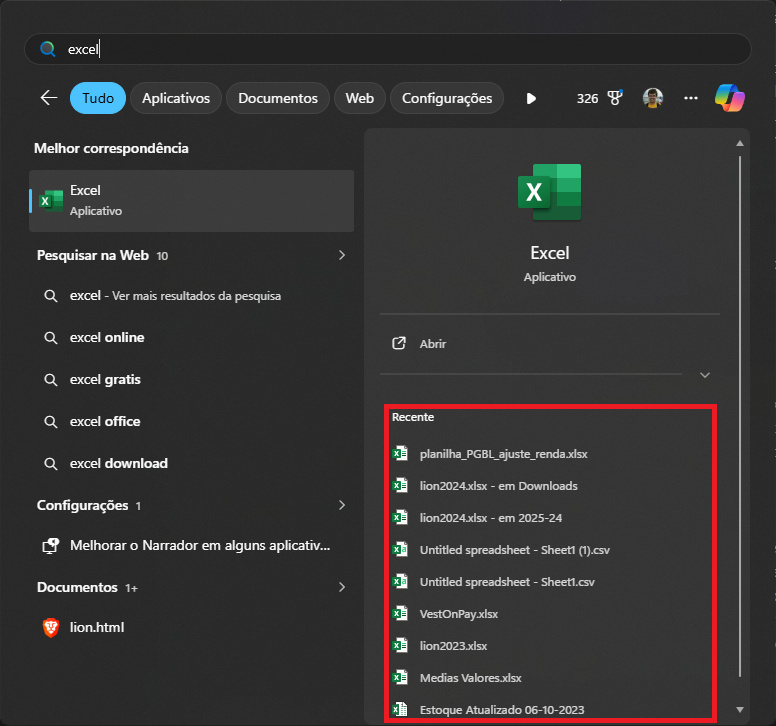
All of my not so creatively named spreadsheet files which I recently opened
It was not a requirement for me that the main launcher should support this, as I’m fine remembering to use the Windows one when that’s the case, but it would be great if it did, so I could centralize everything.
Testing the Launchers
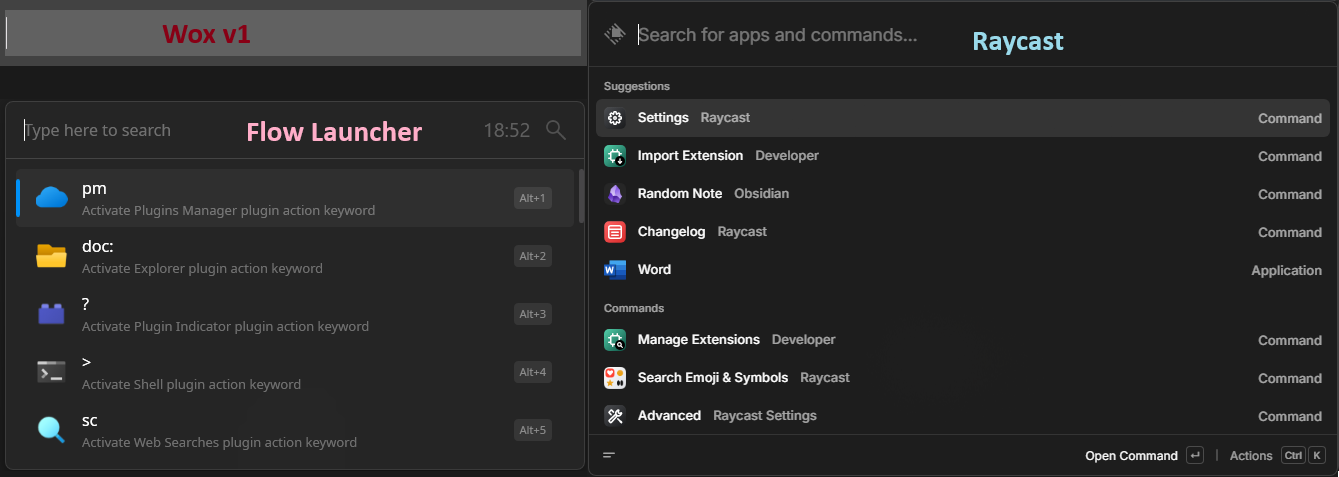
Launchers as they appear when the hotkey is pressed. Wox (top left), Flow Launcher (bottom left) and Raincast (right)
Wox v1
It is simple, fast and it gets the job done. It doesn’t look fancy as the others do10, still I used it all this time, with just the built-in plugins11 and was satisfied, period. To this day some people get a bit shocked when I just hit the hotkey and type a JIRA key into an empty search bar, as seen above, and all of a sudden I’m there, without touching the mouse.
It also does a very good job at searching files on my system once I integrated it with Everything, especially because I have several files with the same name but on different folders, like 2025.txt12, and it would display the results with the path, so I could quickly find which one I wanted.
There is only a minor nuisance: sometimes it gets calculations wrong. It is not catastrophic, I’m good at doing math mentally and most of the time use Wox for double checking, notice it was wrong, erase the last digit and type again, which would then fix it13. Still it bothered me.
All in all Wox was fit for all my needs, except sometimes unpredictably, it wasn’t.
A note on Wox v2
I realize it might be a bit hypocritical on my end to test Raycast on a beta version and not give Wox the same chance, but a very fast trial showed a big blocker:
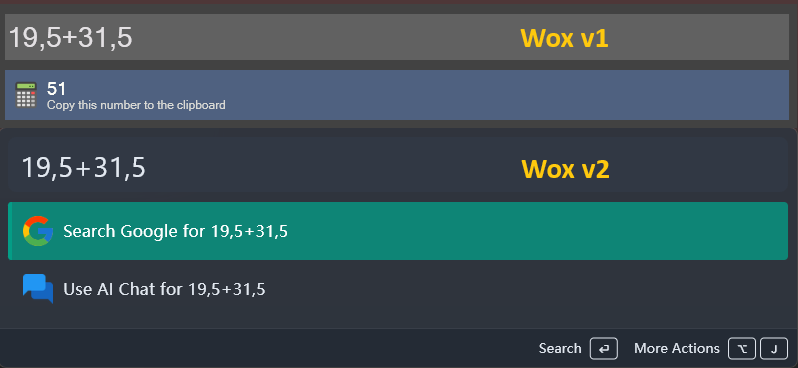
Trying to sum 19,5 + 31,5 on Wox v1 and v2.
In Brazil the decimal separator is the comma. Wox v1 allows you to configure it and also interprets both dot and commas as decimal separators at the same time, so if for any crazy reason you try 19,5 + 31.5, it would still output 51. v2 on the other hand neither allows configuration of the decimal separator, nor automatically identifies comma as one, as seen above, but I filed an issue for them to improve and the developer is on to it!
Flow Launcher
Right from the installer I’m guided through the app and hotkey configuration and get a feel that the Flow Launcher was developed with better user experience in mind. It also has better experience when in use, since it has hints of quick access shortcuts like Alt + number to directly open a result14:
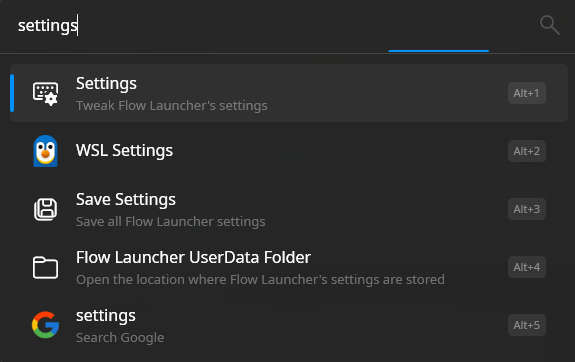
Searching for settings and having quick navigation to the top 5 results with the alt key
There is also the option of opening a context menu on the result, which is helpful if you searched for a file and want to open it in a different program than the default, for example.
Thinking about my basic needs, I could easily configure its built-in web search plugin to navigate to JIRA and Confluence. I did have a harder time with its file search capability: the native one wasn’t useful at all. When I configured it to use Everything it improved dramatically, but then sometimes it seems like Everything does not start-up or crashes and all of a sudden file search hangs. Then we get to the final boss, the calculator:
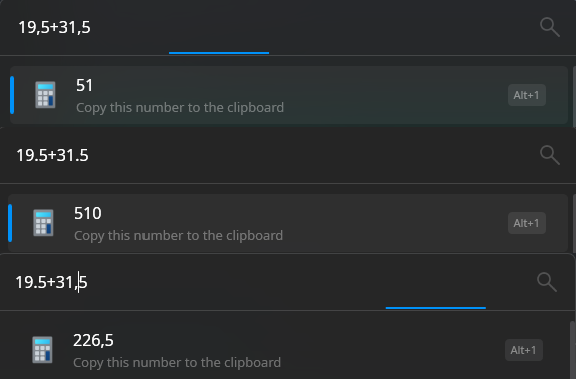
Trying to sum the same numbers using different and mixed decimal separators
Contrary to Wox v2 its decimal separator is configurable and as long as you did configure, you can calculate using the same, but compared to Wox v1, it cannot deal with mixing comma and periods15, which hopefully they’ll agree to fix. I also could not use the Windows key on the hotkey, but that can be worked around with muscle memory more easily.
Raycast
Of the three tested alternatives, Raycast is the only one which is not open source and it has some added quirks or differences due to this:
- Instead of downloading from GitHub, you download from the Microsoft Store16, theoretically a safer place to browse and install applications.
- It is not 100% free, with “Raycast Pro” and “Advanced AI” plans required if you want native AI integration or cloud backup. I find it fair enough since these cost money, but limiting custom themes or clipboard history to paid plans is a bit more questionable.
- It works a lot better out of the box, looks more polished and has great documentation, probably due to having a budget from the paid plans to hire one or more full time developers, instead of being a hobby project like the others.
Looping back to my three basic needs, its file search worked flawlessly from the very first use, without having to configure Everything17 with an added benefit that it seems to sort the search results better, ranking recent files first and even considering lists of ignored files.
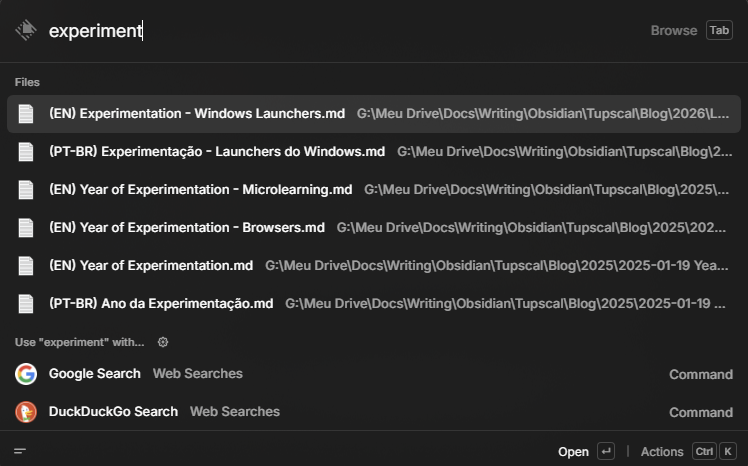
Searching through the raw file of this text
Configuring the quick web searches worked, but was a bit different, since Raycast expects you to configure everything from its search bar. There were minor usability quirks, like hitting the key then tab to fill the query, instead of space, but one could get used to it.
Then on the most challenging of the tests, the calculator, it seems to do as great a job as Wox v1, with the added benefit that it looks cooler:
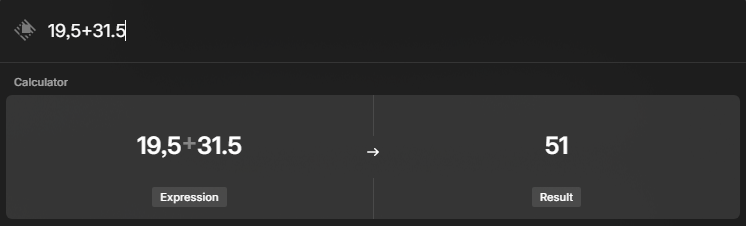
Doing mixed decimal separator sum on Raycast
Plug-in showdown
I have been basically using Wox with the native plugins up until now, but when I installed the newest launchers I found life could be a lot easier with some plugins, so I decided to write a separate section for my experience trying them out.
Browsing Plugins
You can search and install plugins from within the launcher search bar on all of them, though only Raycast will show and use statistics like number of downloads, sorting by it automatically and will allow filtering by categories. Additionally, you can use each of their websites to browse them, with Wox offering a very simple interface with no filtering or sorting, Flow allowing filtering and using random sorting and Raycast boasting the same capabilities as its native search option.
Using Plugins
An interesting thing about Raycast is that it allows each plugin to have multiple commands and you can define hotkeys for each of them if you’d like. The downside of this is that it kind of expects you to select a plugin command first, then enter the query, whereas for Wox or Flow you can just type the plugin hotkey followed by the command and there you go, which seemed like faster usage over time.
Tested Plugins
I chose some plugins which I knew would be useful from my daily habits and interests and ranked them using medals. An ❌ is unavailability, whereas a 🚧 denotes it is there, but malfunctions.
| Plugin | Flow | Raycast | Wox v1 | Wox v2 |
|---|---|---|---|---|
| Board Game Geek | 🚧 | 🍎-only | ❌ | ❌ |
| Currency Converter | 🥈 | 🥇 | 🚧 | ❌ |
| Obsidian | 🥉 | 🥈 | ❌ | 🥇 |
| Spotify | 🥇 | 🥈 | 🚧 | 🚧 |
| Thesaurus | ❌ | 🥈 | 🥈 | ❌ |
- Board Game Geek: No working implementation, since Flow’s errors and Raycast’s is MacOS exclusive.
- Currency Converter: It’s built-in on Raycast’s calculator, so it looks neat, but is non-configurable. On Flow it’s a plug-in and a bit uglier, but it allows configuring default currency, so you can input a single number and see what it converts to, without specifying source and destination currency.
- Obsidian: Flow’s is only a shortcut to open Obsidian, whereas both Raycast and Wox v2 show previews. I prefer Wox’s because it requires less typing and it searches on demand.
- Spotify: Couldn’t get past authorization on Wox. On Raycast it requires selecting a command then doing something, whereas on Flow you can type the command, which seemed faster. Interesting to note that both request a lot of Spotify permissions, but Flow’s requests a bit more.
- Thesaurus: I found it to be a tie, Raycast shows it in a much nicer format, but errors out more frequently, whereas Wox v1 is trustworthy, but a bit more confusing.
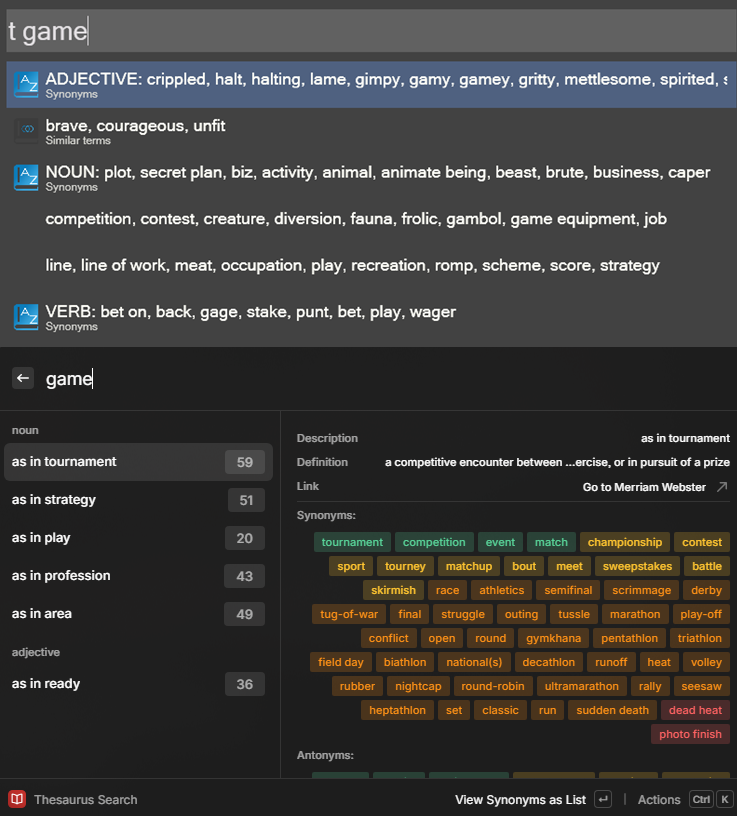
Wox v1 (top) vs Raycast (bottom) searching for the same word “game”
The Verdict
I’ll try to use Raycast from now on, it is clearly the most polished and powerful, despite its usage mode not being my preferred style. Flow looks great compared to Wox v1, but would often show weird behaviors. I’ll keep an eye out for Wox v2’s official release though, as it improves on the visuals and seems to be incorporating some strengths of the other two, and it is open source, which is always a plus!
None of them ultimately had support to Windows jump lists and none was a clear winner on all of my assessments, so the conclusion is:
I was happy with Wox and now I’m not satisfied with any hahahahahaha
Hope you enjoyed this article and happy launching 😂.
I looked and there are 5 togglable configurations. ↩︎
Like searching within your Obsidian notes or playing music on Spotify. ↩︎
The latest stable version seems to be v1.3.183, all others that follow are either marked as beta or pre-release, but I’m considering the 2.0.0 because it seems to be a big rewrite in the making and it more closely resembles what the other launchers are doing today. ↩︎
Depending on whether you’re running version 1 or 2. ↩︎
If you know PowerToys, you might be thinking about PowerToys Run, which is also a launcher bundled within it, but the Command Palette is considered its successor, hence why I’m listing it instead. ↩︎
It’s hard to tell with precision as their extensions are just like any other app on the Microsoft store and as such it’s difficult to search & browse only extensions of the Command Palette. There are even threads on Reddit of people trying to build a list for easier browsing. ↩︎ ↩︎
When I started this I didn’t know there was a major revamp in the works with version 2.0.0. ↩︎
I noticed this when I saw several plugins on Flow by the author of Wox and even a “porting Wox plugins guide” on Flow’s documentation. ↩︎
Especially if it involves going through several folders on Microsoft Teams. ↩︎
The upcoming version 2.0 looks more modern, but I didn’t test it at length because of details to come in the next paragraph! ↩︎
Funnily enough when I started the experimentation phase for all the launchers I was confident that Wox was letting me down in terms of plugins, just to find out during the writing of the post that they have been there all the time, I just never clicked to install them 😂. ↩︎
Please don’t judge me. ↩︎
Likely it misses the notification of “new character entered” and as such doesn’t register the last digit, getting the wrong result. ↩︎
While Wox v1 also natively supports this, it has no hints, so I never found out. I didn’t see support for this on Wox v2 nor Raycast, but then both are still in beta, so maybe it will still come. ↩︎
You might be thinking I’m very picky right now, but I promise you that working mostly typing in English and speaking in Portuguese makes you choose the decimal separator almost at random. ↩︎
Fun fact, while writing this, I decided to look up the other launchers on Microsoft Store. I didn’t find Flow, but I did find Wox and it was not free there! It seems like someone might have “stolen” it and published it for a profit, as confirmed by the developer. ↩︎
Maybe it’s used under the hood, but there was no hint about it anywhere. ↩︎